
Eliot Prince launched a new business and website about a month before recording this walkthrough, and with one month of traffic data, he sat down to do the site’s SEO inside Claude. His channel usually covers income topics, including the laziest ways to make money with AI, but this session is narrower. It shows how to use Claude for SEO when the assistant can see real numbers instead of guessing, and it ends with an audit, a 30-day plan, and a dashboard.
His starting point is blunt. Ask Claude for an SEO audit with no data connected and it will produce one anyway, filled with estimates it cannot verify. The fix is wiring Claude to the tools that hold the data, then giving it written context about the business.
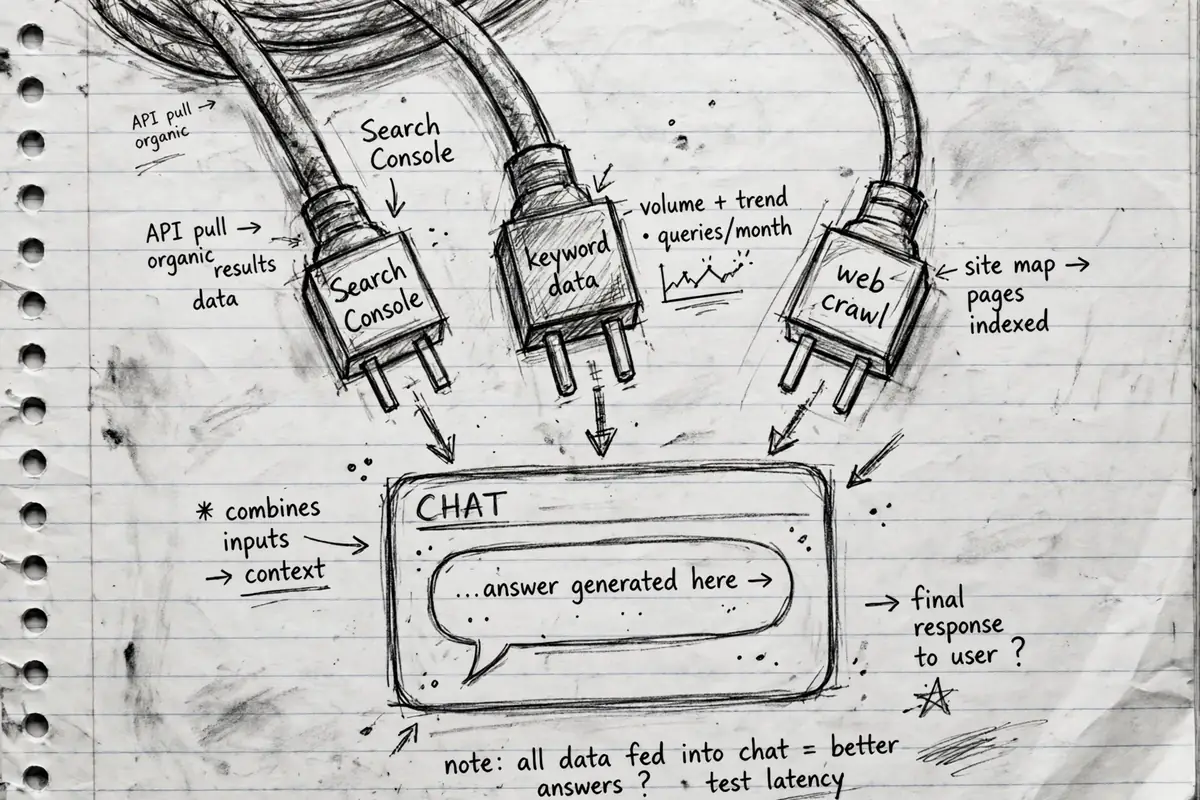
Step 1: Connect Claude to real data sources
Prince adds three connectors before doing any SEO work.
Composio for Analytics and Search Console
Claude has no built-in connector for Google Analytics or Google Search Console, so Prince routes both through Composio, a middleware service for linking apps to AI assistants. He connects his Google account inside Composio, then adds Composio to Claude as a custom connector.
The payoff is plain-language reporting. He asks how many visitors his site had in the last seven days, and Claude pulls the figure through Composio: 1,500 visitors, with daily totals and page views, and a note that traffic ran about 5 percent lower.
DataForSEO for keyword and competitor data
The second connector is DataForSEO, an API that supplies search volume, keyword competition, competitor keywords, backlinks, and AI mention checks. Prince adds it as another custom connector.
His cost notes are modest. He says the service usually starts with $5 of free credit, and the $50 balance he loaded some time ago is projected to last him close to three years. Asked for the search volume for “AI training course,” Claude returns 1,000 searches a month in the UK and 3,500 in the US, plus a competition score and the cost per click advertisers pay. His reading of that last number: a high cost per click means advertisers value the term, so a ranking page on it is probably worth having.
Firecrawl for reading the web
The third connector, Firecrawl, is already listed inside Claude. It lets Claude pull content from far more pages than the standard web search feature, which matters when Claude has to read a whole site. It is free to start.
Step 2: Create a Claude Project that holds the SEO role
With the connectors live, Prince creates a Claude Project named after his site, something like “Halfday Thursdays SEO expert,” and gives it custom instructions.
They tell the project what it is (an SEO and AI search advisor for that one website), where to fetch data (Search Console and Analytics through Composio, keyword data through DataForSEO), and the rules to follow: use real numbers, read the live page before commenting on it, rank suggestions by payoff, explain jargon. He tests it by asking the project who it is. It answers with the role and the rules.
Every document from the next steps gets saved back into the project, so a fresh chat can pick up where the last one stopped.
Step 3: Build an “about my business” context document
Prince argues that “I run an AI training company” is too thin for useful SEO advice. So the next prompt asks Claude to read his entire website and draft a document covering what the business does, who it serves, what it sells, and the alternatives customers compare it against. The prompt borrows its structure from April Dunford’s positioning book “Obviously Awesome.”
Claude read the site and came back with questions, because the site did not state everything. Prince answered by dictating with a voice tool. His answers, given on camera: membership at $170 a month or $1,700 a year, live sessions every Wednesday, an audience of small business owners and solo operators, and a community past 200 members. He checked it, then added it to the project as a context file. His tip: clear up every gap Claude flags. Facts missing from that document are facts every later answer will get wrong.
Step 4: List the buyer questions your site never answers
Next, Prince runs what he calls a stranger test. The prompt asks Claude to read the site as a first-time buyer and list the questions a visitor would ask across five areas: cost, problems, risks, comparisons, and alternatives. It also asks for an AI read: what an assistant like ChatGPT would conclude from the site alone. The output is one table, ranked by how likely each gap is to cost a sale.
His audit returned 15 gaps. The top one: his pricing was not on the website at all. It sat behind the payment step, while competitors showed theirs openly. Competitors also published comparison pages and far more proof, including member results he had not put on his site yet. He saved the gap list into the project.
He cites a stat for this: 95 percent of owners think their site says everything; 80 percent of consumers say most sites leave things out. His citation, not a verified figure.
Step 5: Run the full SEO and AI search audit
The audit prompt pulls everything together: the context document, the buyer gap list, the connectors, and a live read of the site. It asks for quick wins, a technical audit, and an AI search audit: do assistants name his business when buyers ask for recommendations, and who do they name instead?
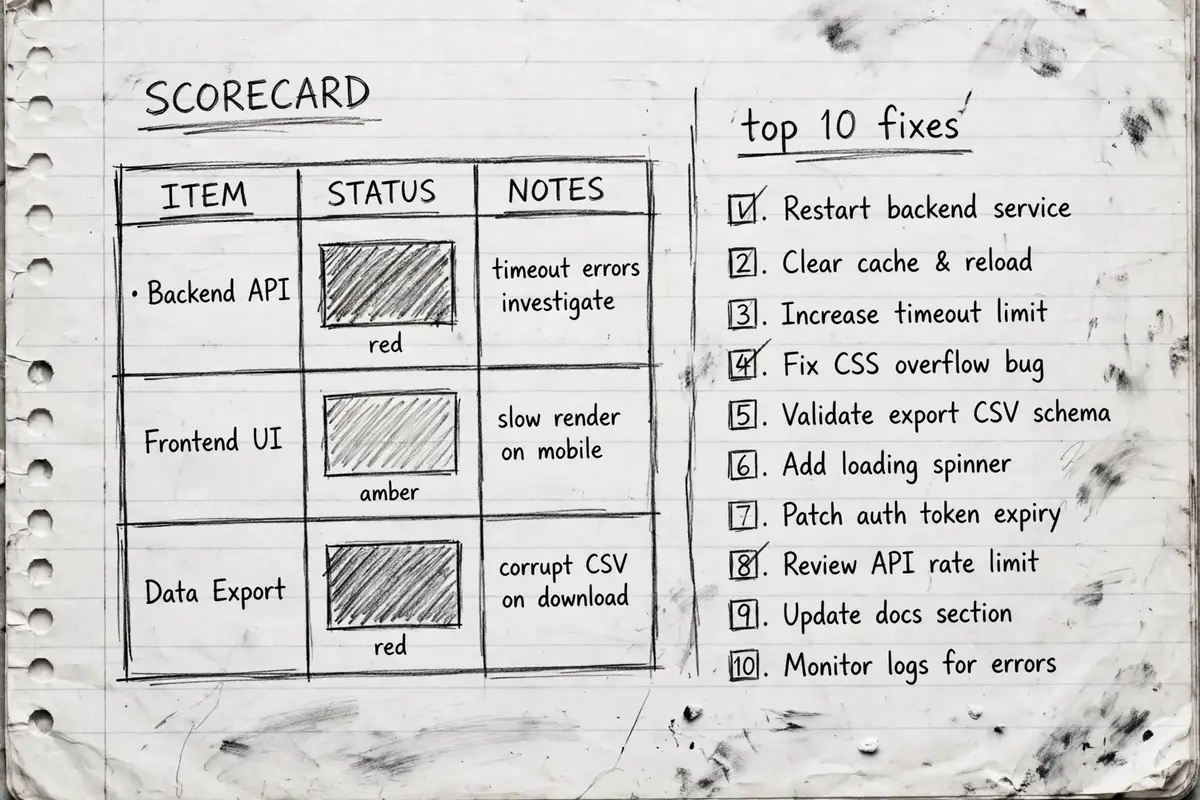
His run took roughly 10 to 15 minutes. What came back: a scorecard and a ranked top 10 list of problems, each with a fix in plain English. On his scorecard, quick wins and on-page work scored red, technical scored amber, and AI search scored red. The headline finding: his search traffic was growing, but nearly everyone finding him already knew his name. The audit also found a competitor with 93 referring domains against his 2.
One fix was structured data, code behind a page that tells search engines and AI tools the business name, who runs it, and what it sells. He calls it a coded business card, and Claude offered to write it for him.
Step 6: Turn the audit into a 30-day strategy
A ranked fix list is still a pile of work. So the next prompt asks for a strategy: strengthen the pages closest to a sale, map blog content that builds topical authority, and lay it out over 30 days. Prince ran this step in a new chat inside the same project; the context files carried over.
The document explained its own terms as it went. Referring domains are simply other websites linking to yours. It listed fixes for existing pages, such as adding his main keyword to the homepage heading and linking his about page to the homepage. It proposed new pages where the data supported them. One suggestion, a page about his Claude training, rested on 6,000 to 7,000 monthly searches across the US and UK for that term, per the figures Claude pulled.
The content side came back as a map: one pillar guide, then clusters around Claude for business, AI for small business, and AI training. Every item carried a priority score weighing business value against difficulty. At his stated pace of three pages or posts a week, the plan sequenced out to 14 weeks. If your longer target is how to make your first million, these are the pages that carry the weight.
Step 7: Execute week one, then build the dashboard
The execution prompt asks Claude to walk through week one of the plan and write the finished assets. In Prince’s run, Claude produced a new homepage title, a rewritten opening, an FAQ, internal link text, and the structured data code from the audit. Claude also wrote a ready-to-paste instruction block for his site builder.
Two details are worth copying. He turned off the connector that lets Claude publish to his site builder, because it sometimes auto-publishes, and he wants a review step in between. And he warns against letting Claude write blog posts from nothing: his workflow feeds Claude source material, a course transcript or an interview, so posts carry his material instead of a rehash.
The dashboard
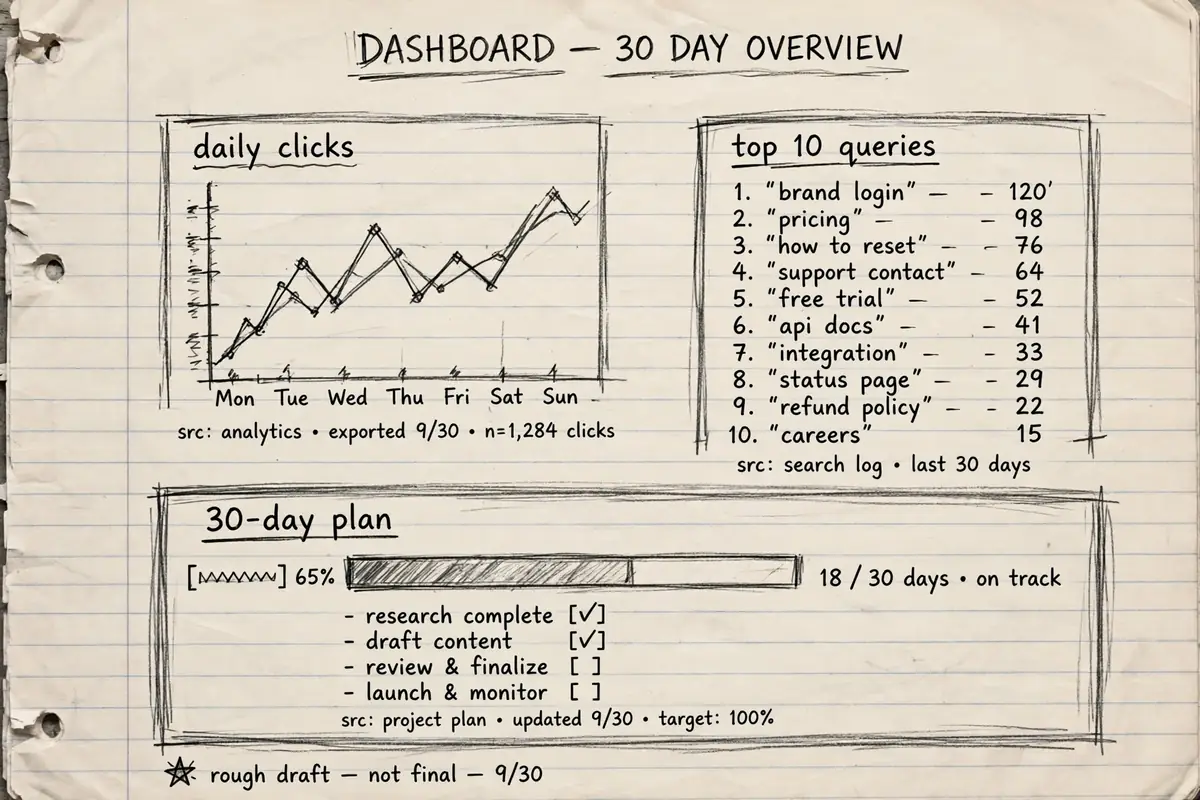
The last prompt asks for a one-page dashboard, readable in 30 seconds, showing whether things are improving and what to do next. It shows daily search clicks, the top 10 queries, the top pages, and progress against the 30-day plan, every number labeled by date range and source. Prince saved it as a live artifact inside the project that refreshes its data. His took about seven minutes to build.
How long does a Claude SEO audit take?
For Prince’s one-month-old site, the full audit ran 10 to 15 minutes. Larger sites can take up to roughly 20 minutes. The slower parts are human: answering Claude’s questions, reviewing the audit, checking assets before they go live.
How to use Claude for SEO without fooling yourself
Everything above is one practitioner’s method, shown on his young website. The traffic figures, competitor counts, and timelines are his numbers, not benchmarks. The process also depends on tool tiers staying as they are, and on Claude reading live data correctly once connected, which is worth spot-checking against Search Console itself.
Prince’s setup was recorded when this video was made. AI tools, connectors and AI search behaviour change quickly, so check the current setup steps and pricing on each tool’s own site before following them.